Photos, redesigned from upload to report
Photos sit in a square grid you can reorder and caption, a new editor marks them up with arrows, shapes and text, Restore original undoes it, and the iPhone and Android apps work properly without a connection.
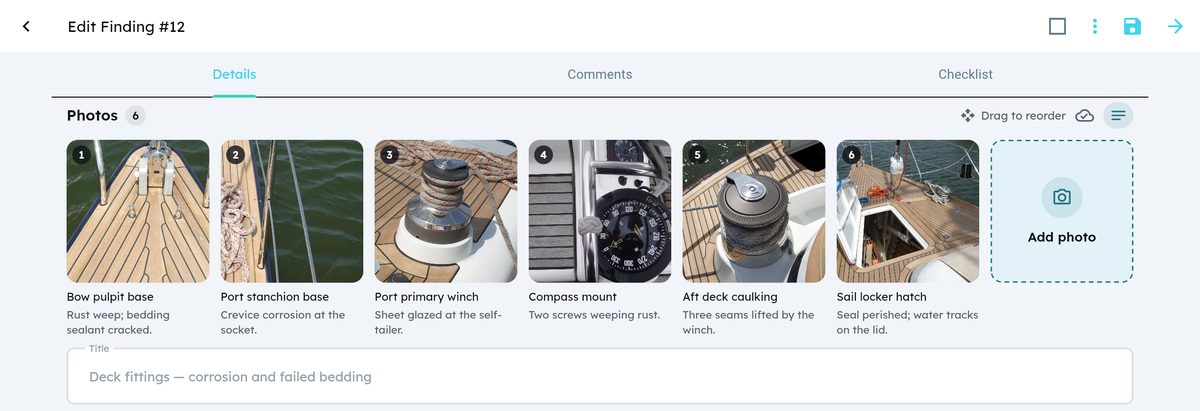
A survey lives on its photos: the lifted caulking, the corroded stanchion base, the fouled propeller. 1.7 rebuilds everything around them. Photos sit in a square grid on every finding, issue, location and report, marking a photo up gets an editor built for it, and the iPhone and Android apps keep working when the marina Wi-Fi does not. The apps also catch up with everything added on the web since 1.6.30.
Photos in a grid
Every photo list, on findings, issues, locations and progress reports, is now a grid of square, numbered tiles. The last tile is Add photo, so adding another one is always right where you are looking. On a phone the grid shows three photos per row.
Put them in order. Hold a photo and drag it to a new place. On a computer a drag handle appears when you point at a photo, and you can drag photos from your desktop straight onto the grid.
Read without opening. Switch on Show descriptions to see each photo's title under it. In progress reports it is on from the start, because that is where captions matter most. On a computer, pointing at a photo shows its title and description.
The issue page now uses the same grid, so photos can be added there offline too.
One toolbar and a new annotate editor
The photo's page has one toolbar: Annotate, Download, Replace, Restore original, Analyze with AI and Delete, in the same place on every screen. On a closed finding, photos open read-only.
Annotate opens a large editor with the photo on a dark canvas, so every colour stands out. Draw arrows, rectangles, circles, lines, freehand and text in 7 colours and 3 line widths, with Undo and Clear all.
Changed your mind? The first time you annotate a photo, YachtInspect keeps the original, and Restore original puts it back.
When you ask the AI to analyze a photo, you can now add a short note, for example "check the stanchion base".
Working offline
On board, the connection comes and goes. The iPhone and Android apps now:
- start without a connection;
- upload photos added offline exactly once when you are back online, even if the connection dropped halfway through an upload;
- let you replace or annotate a photo offline, and keep the colleague who took it as its author;
- show every waiting photo, with its thumbnail, title and the time it was taken, in Photo uploads, and tell photos on this phone apart from photos still on a colleague's device;
- hold everything back while you choose Work offline, until you stop working offline or tap Upload all now.
After you add photos, one message says how many were added, and names any file that was skipped, for example a PDF chosen by mistake.
AI without the extra tick
AI requests no longer ask you to tick an acknowledgement before they run. A short line under the button says instead: "AI can make mistakes. Check before you use it." You will find it under Analyze, AI Fill from Document, Generate locations and the checklist assistant.
Fixed
- Annotating a photo no longer clears its title and descriptions.
- Deleting a photo no longer renumbers the photos of other findings, issues and locations.
- Photos that have not been uploaded yet no longer appear in PDFs as broken images.
- Photos added offline from an issue are linked to that issue.
The apps catch up
Since 1.6.30 a string of improvements arrived on the web first. With 1.7 they are in the iPhone and Android apps too:
- The Export API: send a yacht's findings, with checklist actions, comments and photos, to your fleet-management, claims or BI tools, with read-only keys tied to one yacht.
- The AI assistant in the report designer shows what it is doing, step by step, and the report designer preview matches the exported PDF.
- Older locations are visible again in lists and pickers.
- Deleting a voice recording on a comment no longer closes the app.
- Buttons say what they do when you long-press them.
- Files and photos can only be opened by signed-in users, or through the links the app itself creates.
Version 1.7.0 is available in the web app, on the App Store and on Google Play.