YachtInspect 2.0: redesigned from Home to the finished report
Every screen is redesigned, the report editor is rebuilt, the report AI works with facts only and asks when one is missing, and your team sees exactly the yachts it is invited to.
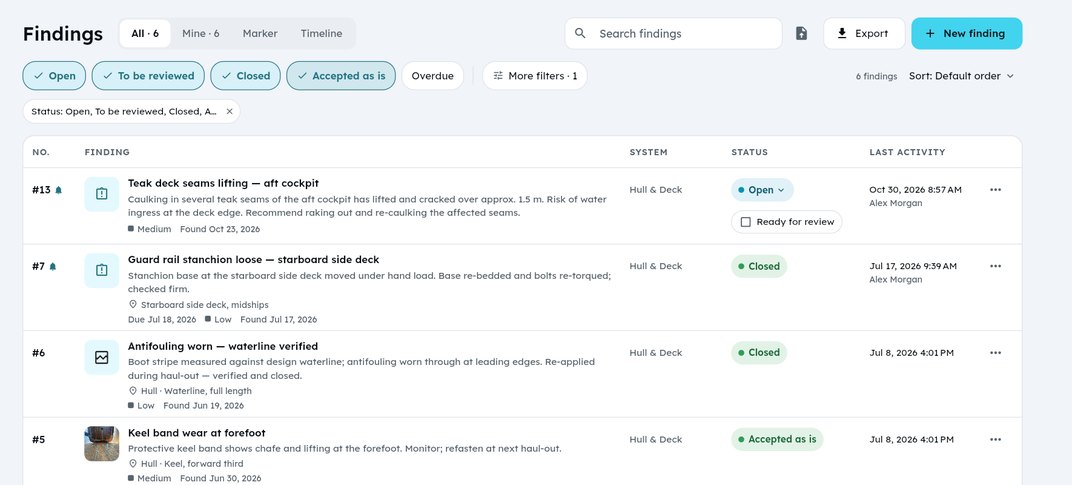
YachtInspect 2.0 is the biggest update since launch. Every screen is new: Home, findings, reports, team, company and settings. On tablets and the web a side rail keeps everything one tap away. The report editor is rebuilt from the ground up, and the AI that helps you write reports now sticks to the facts.
2.0 is available on the web and for iPhone and iPad now; the Android update is rolling out on Google Play.
A report editor built for surveys
On wide screens the editor has three columns: pages, Add and layers on the left, the page in the middle, properties and the AI on the right. From 1440 px several side panels can be open at once.
- Reports save themselves. Finish publishes the report. A published report keeps its version and its PDF until you publish it again.
- The findings filter is saved with the report, so the PDF, the canvas and the counts always show the same findings.
- Richer text: bold, colour and size per word, numbered lists like 7.1., quotes and paragraph spacing.
- More building blocks: new table options, label lists for yacht and claim data, photo captions with optional numbering, more header and footer layouts, a signature block and the date of the pictures on the cover.
- German PDFs are now fully in German.
AI that works with facts only
The report AI only uses what is in your project, your photos and the documents you give it. When a fact is missing, it asks you instead of inventing it, and it highlights AI placeholders in the template until they are filled.
- Send several photos and PDFs to the AI at once and add case facts to a report.
- Every AI change is shown before it is applied: tick what you want, apply it, or undo it.
- Key users can create company AI shortcuts for the requests your team uses every day.
- Fill a finding with AI from a photo and a short note.
Findings, yachts and the deck plan
- Redesigned finding details, a new status sheet, deck plan markers and the Timeline (Gantt).
- Findings get their number from the server, so numbers never clash.
- Team members see the yachts they are invited to; Key users see the whole company fleet.
- New yacht and claim fields, including insurance sum, deductible, displacement and sail area.
- Dictate photo titles and descriptions.
Team, company and security
- One Team page for members, invitations and seats.
- Joining a company works by invitation only, confirmed by e-mail.
- Redesigned Company details with autosave, Documents for approved company documents, and support tickets with their own numbers.
- Two-factor sign-in is on by default for Standard, Key user and Admin accounts. Existing users have 14 days to set it up; accounts that sign in only with Apple or Google don't need it.
- Plans are bought on the web; the apps show your current plan.
Onboarding, guided tours, notification settings, profile, billing and Help are redesigned too. Help now opens the online documentation.